
Architect Your World. Write Your Masterpiece.
The all-in-one local workspace to draft your manuscript, architect living lore, and visually plot your story in a distraction-free, local-first environment built for complete creative ownership.
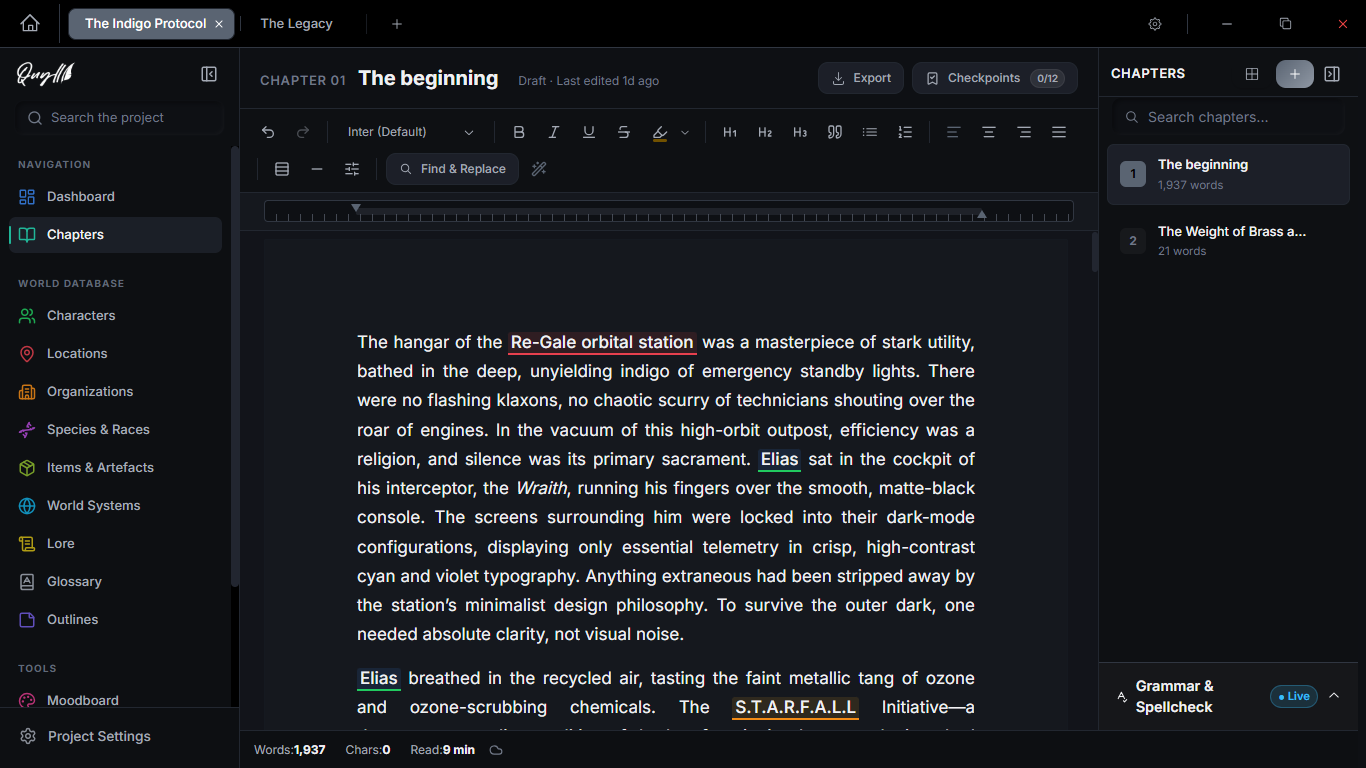
Crafted Specifically for Novelists.
Most writing tools force you to juggle note-taking apps, world wikis, and plot boards. Quyll unifies your entire storytelling pipeline in one place.
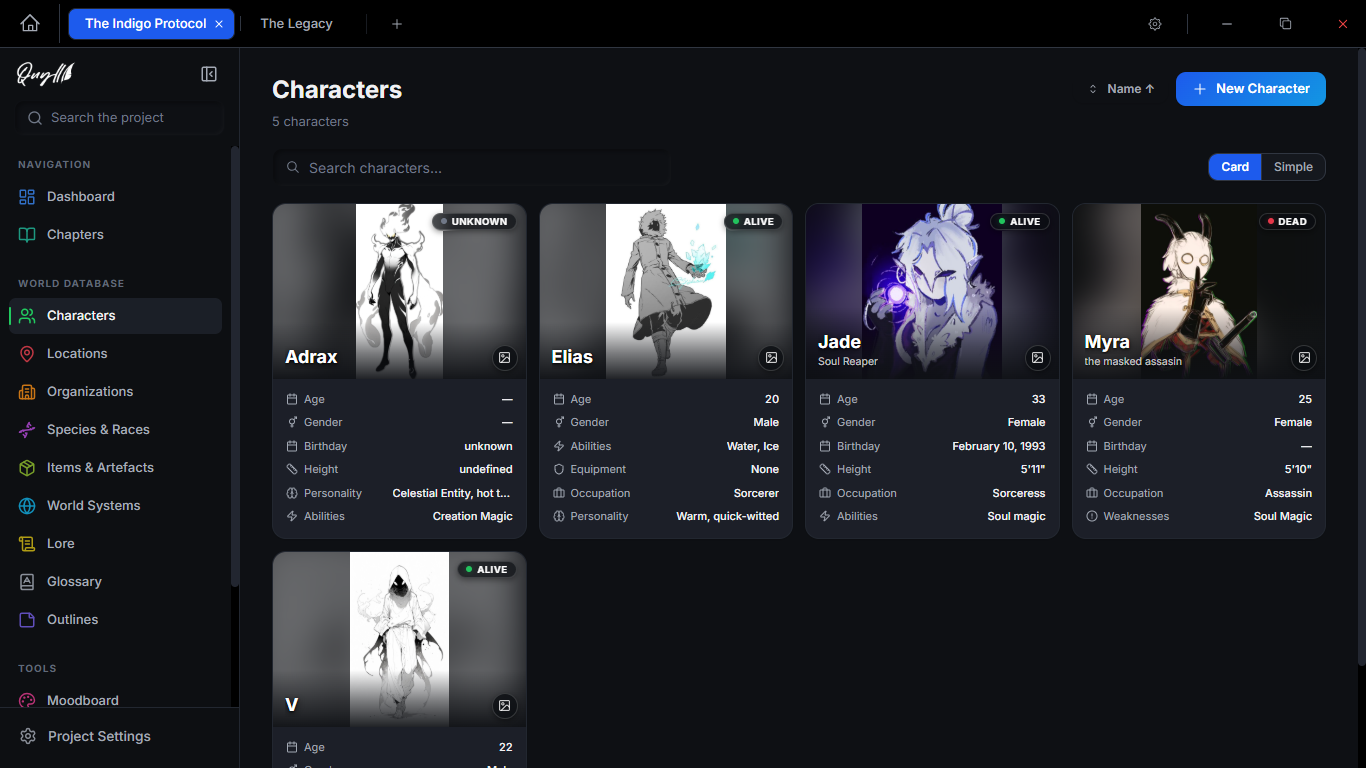
Living World Database & Lore Codex
Keep your characters, locations, and lore effortlessly connected as you write. Build rich character profile cards with custom attributes, relationship webs, status indicators (Alive, Dead, Unknown), and deep lore entries that cross-link directly into your manuscript prose without breaking your flow.
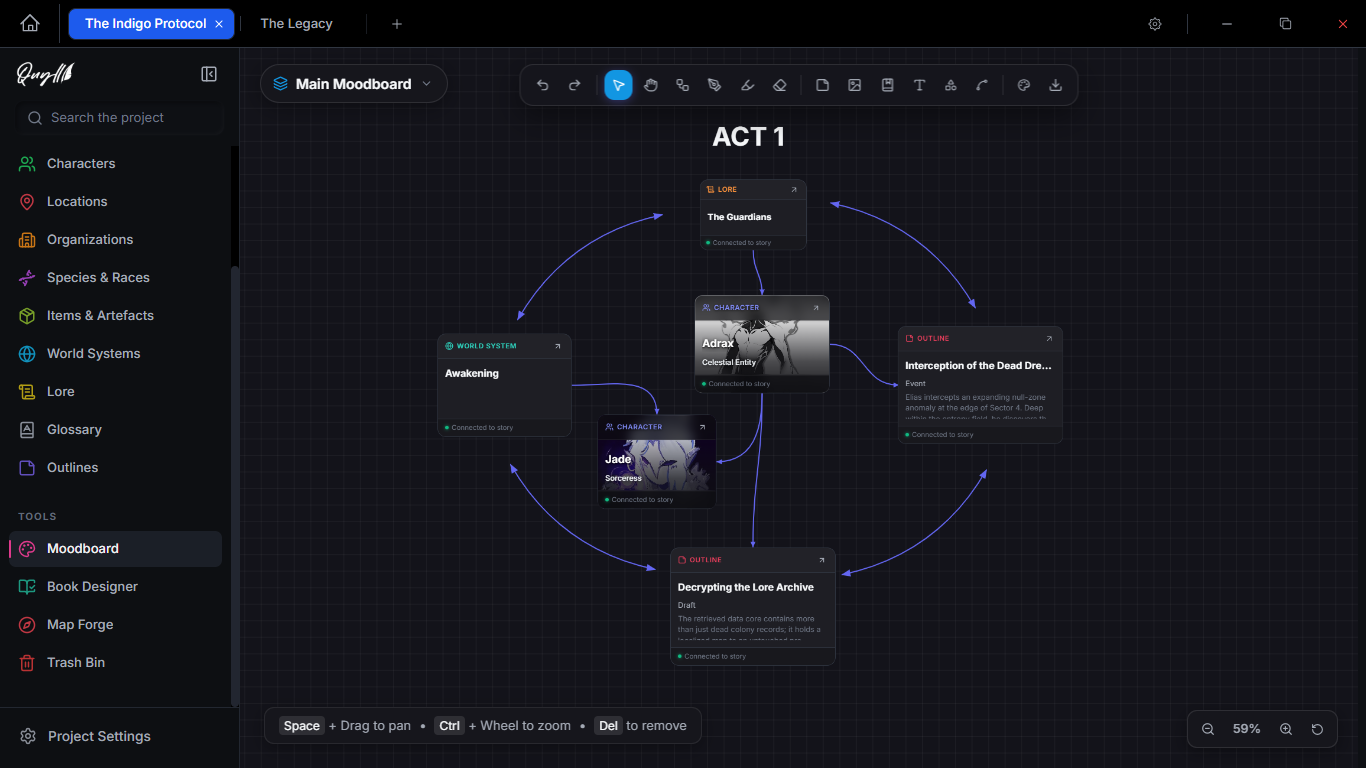
Infinite Visual Moodboard
See how your story ideas and plot threads fit together visually. Map out story arcs, character connections, and thematic webs in freeform space. Pin aesthetic inspiration cards and connect narrative threads with curved vector links to discover how your plot pieces lock together.
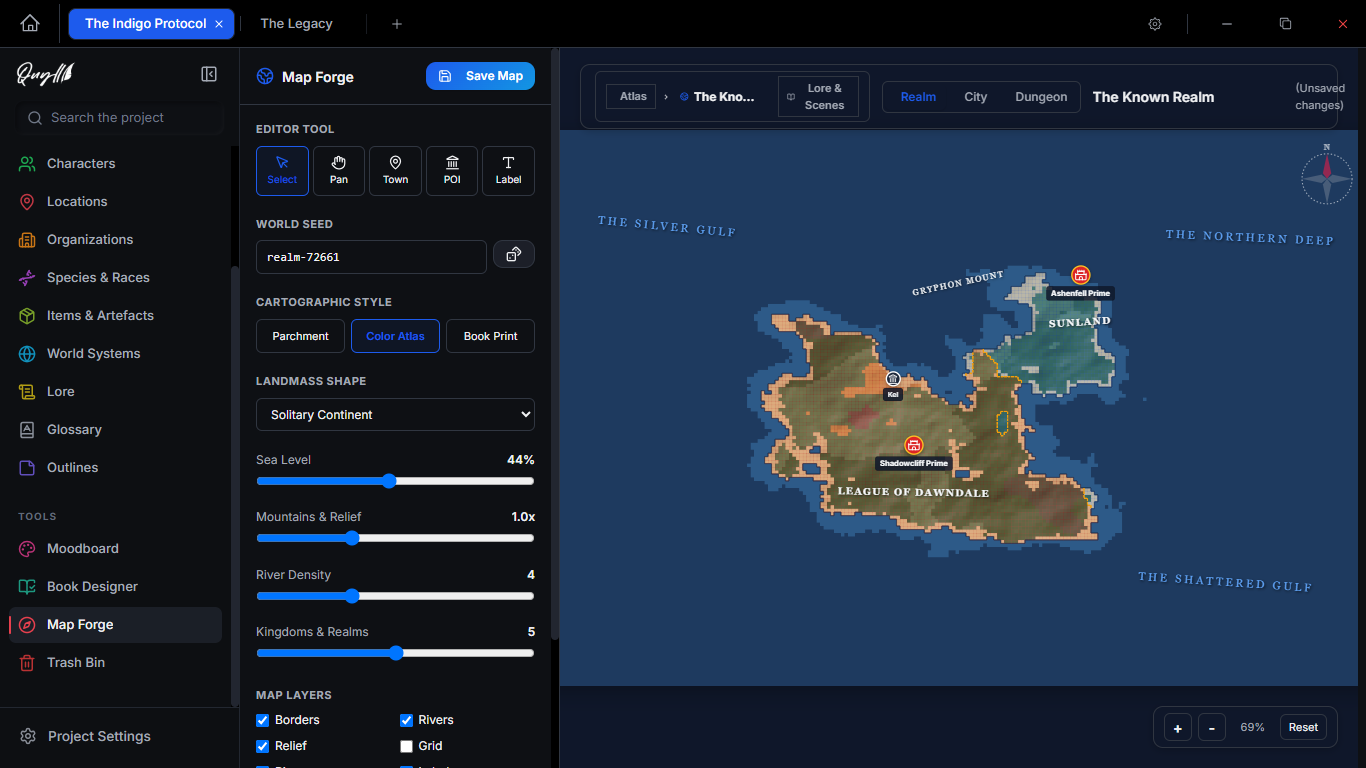
Interactive Map Forge
Bring your fantasy geography to life and anchor it directly to your lore. Generate procedural continents with custom relief and sea levels in seconds. Drop interactive settlement, landmark, and battle pins that link directly into your world codex so your story's geography is always consistent.
Outliner & Narrative Beat Architect
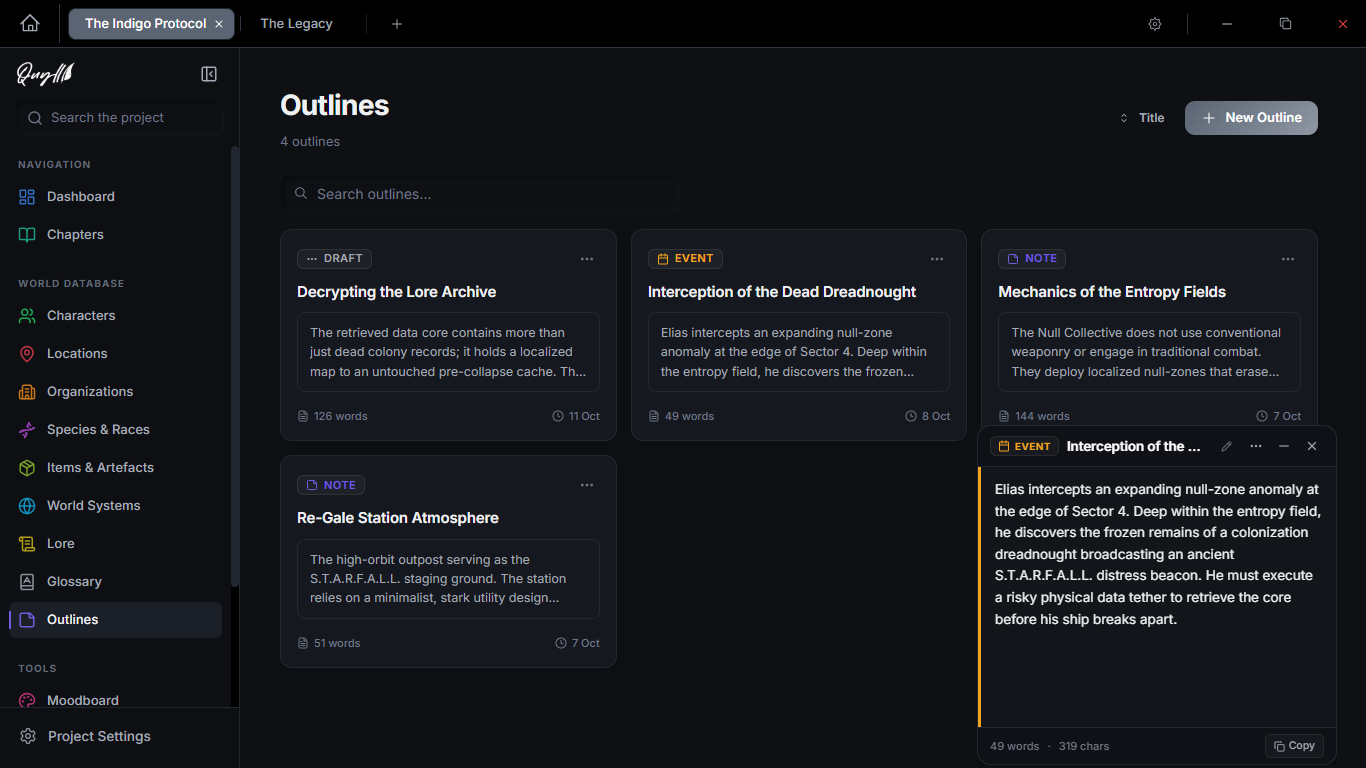
Shape your narrative beats before committing to the prose. Structure complex storylines into acts, chapter beats, and lore milestones. Inspect scene synopses, track target word counts, and rearrange your plot structure seamlessly in slide-out inspector drawers.
Multi-Device Cloud Sync & Zero-Loss Draft Protection
Write seamlessly across desktop, laptop, and upcoming mobile devices without sacrificing offline independence. Incremental cloud synchronization coordinates your chapters, characters, and moodboards in the background. If you edit offline on two devices at once, Quyll never overwrites your work. Instead, an interactive side-by-side comparison highlights every changed word, letting you choose what to keep or preserve both versions as separate chapters with zero risk of lost prose.
Harper Grammar & Prose Style Linter
Catch pacing lulls and polish your prose with private, stylistic linting. Catch weak verbs, clichés, passive phrasing, and wordiness in real time—powered entirely offline by the Harper engine with zero cloud exposure and an integrated smart thesaurus.
Universal Export & Complete Portability
Share your manuscript anywhere with complete format freedom. Export cleanly to standard DOCX for editors or print-ready PDF for proofreading. Stored in standard local SQLite, your manuscript is portable and yours forever.
Free to Create. Pro to Protect.
Quyll will always be 100% free and private to write and build worlds with. Quyll Pro adds quiet, automated cloud protection and snapshot history for your entire workspace.
The complete creative studio for novelists, authors, and worldbuilders. 100% offline and yours forever.
- Full distraction-free manuscript editor & focus modes
- Living World Database & character codex
- Infinite spatial visual Moodboard with vector links
- Procedural Map Forge fantasy cartography
- Narrative Outliner & scene beat architect
- Offline Harper grammar & prose style linter
- Universal exports: standard DOCX and PDF
- 100% local SQLite storage (zero cloud lock-in)
- Full local project backups & manual export archives
Multi-device cloud synchronization, automated snapshot safety, and upcoming mobile companion app access.
- Everything included in Free, plus:
- Multi-Device Cloud Sync — seamlessly sync manuscripts, lore, and moodboards across all your devices.
- Zero-Loss Draft Protection — visual side-by-side comparison ensures offline edits never overwrite your prose
- 15 GB Encrypted Cloud Vault — dedicated secure capacity for your entire multi-project library
- Zero-Click Automated Backups — runs quietly in the background at your chosen interval
- 30-Day Snapshot Recovery — point-in-time timeline to restore earlier chapters or deleted entities
- Offline Save History (Last 50 Saves) — browse revisions and compare word-by-word diffs locally
Quyll is a single desktop studio. Write 100% free locally forever, or activate Pro anytime from your in-app settings.
Everything You Need to Know.
Common questions about Quyll's sovereign architecture, worldbuilding systems, and privacy standards.
What is Quyll?
Quyll is a modern, local-first desktop writing sanctuary and worldbuilding studio built for novelists, authors, and storytellers. It integrates long-form manuscript drafting, a relational world database (characters, locations, factions, and world systems), visual moodboards, procedural map cartography, and narrative beat outlining directly on your desktop.
Who is Quyll designed for?
Quyll is designed specifically for fiction writers, novelists, fantasy and sci-fi worldbuilders, screenwriters, and storytellers who want a distraction-free, privacy-first alternative to juggling multiple disconnected apps or relying on cloud subscriptions.
Is Quyll really free?
Yes, completely. The core Quyll desktop studio is 100% free with no time trials, word count limits, or locked creative tools. You get unlimited local projects, long-form manuscript drafting, relational worldbuilding (characters, locations, factions, and world systems), visual moodboards, procedural map cartography, narrative beat outlining, Harper style linting, and universal exports free forever.
Quyll Pro is an entirely optional cloud protection service ($5/month or $50/year) designed for writers who want an automated offsite safety net: 15 GB of encrypted cloud vault storage, automated scheduled backups, and 30-day point-in-time snapshot recovery. If you prefer to manage your own backups manually, the core app remains entirely free without any catch.
What happens to my projects if I cancel Quyll Pro?
You keep every single word. Because Quyll is local-first, all of your manuscripts, lore databases, and maps always reside directly on your computer in local SQLite files—never locked away behind a cloud paywall.
If you decide to cancel Quyll Pro, your desktop application continues running with full creative capabilities and zero restrictions. Automated cloud backup uploads simply pause at the end of your billing cycle. You maintain complete local access to everything you’ve created, and you can still export or manually back up your work whenever you wish.
Can I export my work if I stop using Quyll?
Yes. Zero vendor lock-in is a core principle. We believe writers should own their creative output unconditionally. Quyll provides comprehensive export options at any time:
- Standard DOCX: Industry-standard Word documents ready for literary agents, editors, and critique partners.
- Print-Ready PDF: Clean paginated documents for physical proofreading and reading.
- Open SQLite Databases: Your entire project archive—including worldbuilding metadata, timelines, and notes—is stored in standard SQLite format that you can inspect, copy, or migrate whenever you want.
How is Quyll different from other writing software or note-taking apps?
Unlike general note-taking apps, Quyll is purpose-built for novelists with native chapter planning, an interconnected World Database, visual scene outliners, and procedural map cartography. Unlike legacy writing suites, Quyll provides an ultra-modern distraction-free interface, visual canvas moodboards, and a sovereign architecture with 100% local SQLite storage.
Is Quyll completely offline and local-first?
Yes. Quyll is local-first by default and operates completely offline. All manuscripts, character sheets, and lore entries are stored directly on your computer in standard SQLite databases. You never need an internet connection or account to write, brainstorm, or organize your world. If you choose to enable multi-device sync or cloud backups, only the projects you select are securely uploaded to your encrypted cloud vault.
How does Multi-Device Cloud Sync work with Quyll's local-first architecture?
Quyll remains strictly local-first. You write directly into your local SQLite database with zero typing latency or internet dependence. When an active connection is detected, Quyll's incremental synchronization engine computes a fine-grained changelog and transmits only the specific chapters, character codex updates, or scene beats you modified—keeping your laptop and desktop in sync without re-uploading entire multi-hundred-megabyte projects.
What happens if I edit the same chapter on my laptop and desktop while offline?
In Quyll, silent manuscript overwrites are strictly forbidden. If you make changes on two devices while offline, Quyll flags the chapter and opens a clear, side-by-side version comparison. You can inspect every changed word highlighted in real time, choose which version to keep, or preserve both drafts as separate chapters with a single click. Your writing is never lost or overwritten.
When is the Quyll Mobile Companion App releasing, and what will it include?
The Quyll Mobile Companion App is scheduled for release in Q4 2026 for both iOS and Android. Built on the same offline SQLite engine, it allows writers to review manuscripts, capture spontaneous dialogue or scene beats, and reference the World Database codex on the go. Full cross-device sync will be included automatically for all Quyll Pro subscribers.
Does Quyll read, track, or train AI on my writing?
Never. Quyll enforces a strict privacy standard with zero creative telemetry. We never read, analyze, or train AI models on your manuscripts or worldbuilding notes. Your work remains strictly on your device unless you explicitly choose to back up your archives to our encrypted cloud vault.
What platforms and operating systems does Quyll support?
Quyll currently provides an optimized desktop edition for Windows 10 and Windows 11 (64-bit). macOS and Linux editions are planned.
Where can I download Quyll?
You can download the latest installer directly from the official website or from the public GitHub releases repository.
Begin Your Next Great Story.
Download Quyll today. Free, local-first, and designed to stay out of your way so the words can flow.